


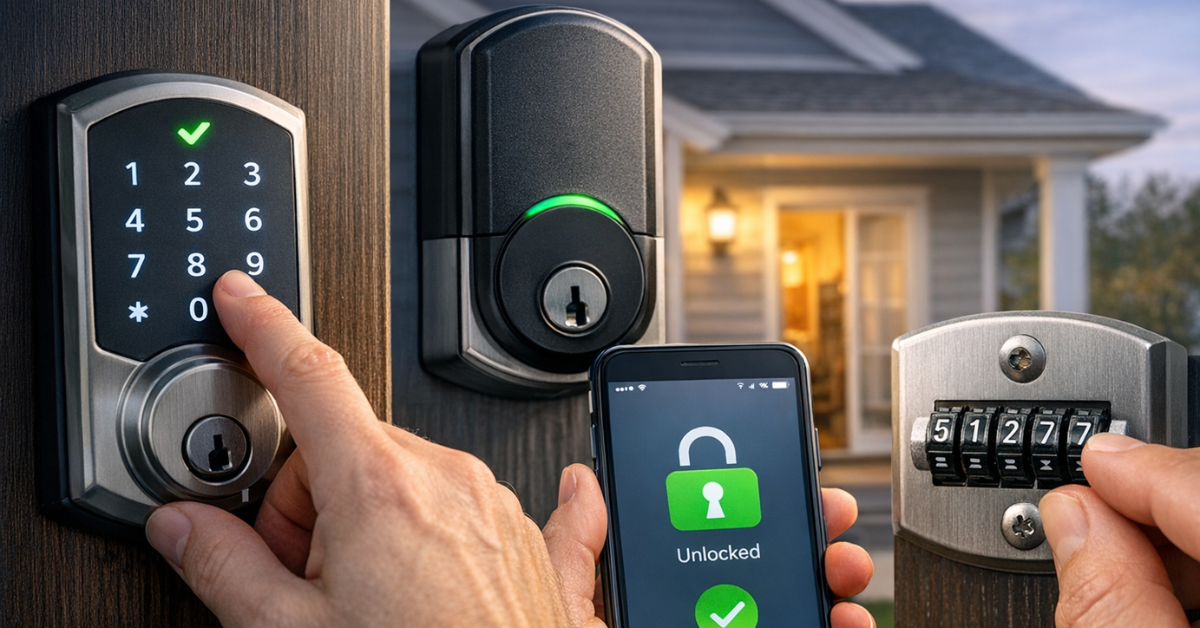
Changing the code on your door lock is an essential security measure, whether you’ve moved into a new home, lost your code, or just want to update it. Knowing how to change the code on a door lock ensures that your property remains protected and gives you full control over access. The process is straightforward and can be done in just a few simple steps.
5 Easy Steps for Changing Your Lock Code:
- Locate the reset button or app settings.
- Enter the master or current code.
- Follow the prompts to reset the code.
- Test the new code to ensure functionality.
- Save the new code securely.
By understanding the steps involved, you can avoid unnecessary repairs or issues down the line. This guide will help you troubleshoot common problems and make sure your door lock is always secure. Whether you have a keypad lock, smart lock, or another electronic entry system, following these steps will ensure you can easily change your code and maintain your home’s security.
Why Change the Code on Your Door Lock?
Changing your door lock code is crucial for several reasons:
- High Security: Regularly updating your code with high security lock ensures that if someone previously had access to your home, they no longer do. This is particularly important if you’ve had visitors, contractors, or roommates
- Lost or Compromised Codes: If you’ve lost your key or suspect that someone knows your code, it’s important to change it immediately.
- Upgrading to Smart Locks: As technology evolves, smart locks offer added convenience and security features, such as temporary codes for guests and app-controlled access, making it an ideal time to change your existing lock code.
Scenarios When You Should Change Your Lock Code:
- After Moving Into a New Home: You never know who has had access to the previous owners’ keys or codes.
- Following a Security Incident: If you’ve had a break-in or suspect your code has been compromised, updating it immediately is a must.
- Upgrading to a Smarter System: With more people opting for keyless entry systems, it’s a great opportunity to switch to a Bluetooth lock or smart lock that offers more control and flexibility.
Security is a top priority for homeowners. Whether you have a keypad lock, smart lock, or mechanical code lock, we offer expert advice and services to help you ensure your home is always secure. If you need assistance with a door lock reset or a smart lock code change, don’t hesitate to reach out.Professional Locksmith services in Coventry proudly provide expert locksmith services to keep your home safe.
Understanding the Different Types of Door Locks
When it comes to securing your home, choosing the right type of door lock is crucial. The right lock system can not only enhance your security but also provide convenience. There are several types of door locks available, each with its own unique features, benefits, and drawbacks. Understanding these differences can help you choose the best lock for your needs.
Keypad Locks
A keypad lock is an electronic locking mechanism that allows you to access your home using a PIN code instead of a traditional key. The code is entered directly onto a keypad, and when the correct combination is entered, the lock releases. These locks can either be standalone or integrated into a larger security system.
Pros and Cons of Using Keypad Locks for Home Security:
- Pros:
- Convenience: No need for physical keys, which can be lost or stolen.
- Multiple Codes: Many keypad locks allow you to program multiple user codes, so everyone in the household can have their own.
- Increased Security: Keypad locks are harder to bypass than traditional locks since there’s no physical keyhole.
- Cons:
- Battery Dependency: If the battery dies, the lock may not function, leaving you locked out.
- Code Sharing: If not properly managed, people can share codes with others, compromising security.
- Wear and Tear: Over time, frequently used keys can wear, potentially making it easier to guess the code.
Smart Locks
Smart Home locks offer an advanced level of security and convenience by allowing you to control the lock remotely via Bluetooth, Wi-Fi, or an app. These locks can be integrated into your smart home system, allowing you to lock and unlock doors from anywhere. You can also set up temporary codes or access for guests or service workers, providing both flexibility and security.
Benefits of Smart Locks for Modern Homes:
- Remote Access: Unlock your door from anywhere with your smartphone, offering convenience when you’re away from home.
- Integration with Smart Home Systems: Many smart locks can be integrated with systems like Amazon Alexa or Google Home, enabling voice control and automation.
- Enhanced High Security: Smart locks can alert you when someone enters or attempts to access your home. Some even feature tamper detection and automatic locking.
- No Physical Key: With keyless entry systems, you never have to worry about lost keys.
Mechanical Code Locks
Mechanical code locks operate by setting a specific combination of dials or levers that must be aligned in the correct sequence to unlock. These locks don’t require batteries or electricity, making them highly reliable and easy to use.
Advantages and Limitations of Mechanical Locks:
- Advantages:
- Reliability: No need for batteries or electronics – these locks are mechanical and last for many years with minimal maintenance.
- No Power Dependency: Mechanical locks work regardless of power outages, unlike electronic or smart locks.
- Simplicity: They are easy to install and use, without requiring complex technology or an app.
- Limitations:
- Limited Access Options: You can’t remotely control or reprogram the code like you can with smart locks or keypad locks.
- Manual Operation: You need to remember the combination or physically dial it each time you unlock the door.
- Code Complexity: Simple codes are easier to guess. More complex codes can be difficult to remember.
If you’re looking for convenience and the latest technology, smart locks or keypad locks are excellent choices. For a reliable, power-independent option, a mechanical code lock could be your best bet. Locksmith service in Coventry offer a wide range of options for securing your home, from traditional mechanical locks to smart lock installations. Whether you need advice, installation, or a system upgrade, professional locksmith services in Coventry and surrounding areas are here to assist you.
Step-by-Step Guide: How to Change the Code on Your Door Lock
Changing the code on your door lock is a great way to enhance your security. Whether you have a keypad lock, smart lock, or mechanical lock, updating the code ensures that only those with the correct combination can access your home. This guide will walk you through the steps for changing the code on each type of lock, and provide troubleshooting tips for common issues.
Changing the Code on a Keypad Lock
Step-by-Step Instructions for Keypad Lock Code Change:
Step 1: Locate the Reset Button: Most keypad locks have a reset button either on the interior side of the lock or inside the battery compartment. Refer to your lock’s user manual for the exact location.
Step 2: Enter the Current Code: Before resetting, you may need to enter the existing code to access the lock’s programming mode.
Step 3: Press the Reset Button: Press and hold the reset button until you see a flashing light or hear a beep. This indicates that the lock is ready to accept a new code.
Step 4: Enter the New Code: Enter the new code on the keypad. Ensure that the code is unique, easy to remember, and difficult for others to guess.
Step 5: Save & Test the New Code: After entering the new code, press the “enter” or “save” button. The lock should beep or show a solid light to confirm the code has been successfully updated. Try locking and unlocking the door with the new code to make sure it works.
Changing the Code on a Smart Lock
Process for Updating Codes on Wi-Fi or Bluetooth-Enabled Smart Locks:
Step 1: Open the Lock’s App: Most smart locks are controlled via an app. Open the app associated with your lock on your smartphone or tablet.
Step 2: Log Into Your Account: You may need to log in with your credentials to access the lock’s settings.
Step 3: Select the Lock You Want to Change: If you have multiple smart locks, select the appropriate lock from the app’s dashboard.
Step 4: Find the Code Change Option: Navigate to the settings or security section of the app and select the option to change the code or PIN. Follow the prompts to enter your new code. Depending on the smart lock, you may need to confirm the code through the app or on the lock itself.
Step 5: Save & Test the New Code: After entering the new code, save it and exit the app. The lock will update, and you should receive a confirmation notification. Lock and unlock the door using the new code to ensure everything is working properly.
Changing the Code on a Mechanical Lock
Instructions for Adjusting the Combination on Mechanical Locks:
Step 1: Locate the Reset Button: Most mechanical locks have a reset button located on the inner side of the lock. You’ll likely need a small tool (e.g., a paperclip or pin) to press it.
Step 2: Set the Current Combination: If your lock allows you to reset it, you may need to open the lock using the current combination before proceeding.
Step 3: Press the Reset Button: Using your tool, press and hold the reset button. This will unlock the dial, allowing you to change the combination.
Step 4: Enter the New Combination: Rotate the dials to your new preferred combination. Make sure it’s secure and not easily guessable.
Step 5: Lock and Unlock to Confirm: After setting the new combination, test the lock to ensure it works and the new combination is secure.
Changing the code on your door lock is a simple yet effective way to maintain security. Whether you’re using a keypad lock, smart lock, or mechanical combination lock, following these clear steps will ensure your door remains secure and functional. If you encounter difficulties with resetting the code, or need further assistance, Kingdom locksmith can provide expert guidance and solutions for your lock issues.
Troubleshooting Common Issues When Changing the Code
Changing the code on your door lock should be a simple process, but occasionally, problems can arise. Below, we outline the most common issues you may encounter when resetting your door lock code and provide solutions to help you resolve them.
Keypad Lock Problems
If your keypad lock doesn’t accept the new code, it could be due to several factors:
- Incorrect Code Entry: Double-check the code you’re entering and make sure it matches exactly what you programmed. Some locks require a certain sequence or timing to accept the code.
- Battery Issues: Low batteries may cause the keypad to malfunction. Try replacing the batteries and attempt the reset again.
- Reset Mode Errors: Some keypad locks require specific steps to enter reset mode. If you missed a step or didn’t hold the reset button long enough, the lock won’t accept the new code.
Error codes or malfunctioning keypad:
- Reset the Lock: If the keypad is malfunctioning, try resetting the lock by following the manufacturer’s troubleshooting guide. Most keypad locks have a master reset function that can restore it to its factory settings.
- Contact Support: If the keypad continues to malfunction, the lock may be faulty, and it may be time to contact customer support for assistance or consider replacement.
Smart Lock Connectivity Issues
Smart locks rely on Bluetooth or Wi-Fi to communicate with your device. If you’re having trouble connecting:
- Check Your Network: Ensure your Wi-Fi or Bluetooth connection is stable. Sometimes, the lock might fail to connect due to weak signals or interference.
- Bluetooth Pairing: Make sure your smartphone or device is within range. If the lock still won’t connect, try restarting the Bluetooth on your phone or resetting the lock’s Bluetooth function.
- Update the App: Outdated apps can cause connectivity issues. Ensure that the app controlling your smart lock is up-to-date.
Solutions for app-related problems:
If your smart lock code won’t update via the app, try logging out and logging back in, or reinstalling the app. If the issue persists, it could be a software bug, and contacting support for troubleshooting is recommended.
Mechanical Lock Reset Failures
Mechanical locks, unlike digital ones, rely on physical dials and mechanisms to reset the code.
- Check for Obstructions: Ensure there are no obstructions in the lock mechanism that could be preventing the dial from moving smoothly.
- Ensure Correct Reset Process: Refer to the lock’s manual to make sure you are following the correct reset procedure. Many mechanical locks require you to press a reset button or hold the dial in a specific position before resetting.
- Reset the Mechanism: If the lock still won’t reset, try gently turning the dial while pressing the reset button. If the lock is still stuck, it may be time to call a locksmith for professional assistance.
Best Practices for Lock Code Security
Ensuring the security of your door lock code is essential for protecting your home. By following some best practices, you can avoid common vulnerabilities and keep your property safe. Below, we cover how to create a secure code, the importance of regular updates, and how to safely share temporary codes.
Choosing a Strong Code
When setting up a new code for your keypad lock, smart lock, or mechanical code lock, avoid using obvious numbers such as 1234, 0000, or birthdays. These patterns are easily guessable. Instead, create a code that includes a random combination of numbers and, if possible, letters. The longer the code, the harder it is to guess.
Regularly Updating Your Code
Changing your lock code regularly reduces the risk of unauthorized access, especially if you’ve had guests, service providers, or contractors who may have the code. Even without an incident, it’s a good security practice to update your code every 3 to 6 months.
Sharing Temporary Codes Safely
If you need to share your code, always do so securely:
- Use a temporary code for guests or service workers, which can be deleted after use. Many smart locks allow you to create temporary access codes for a specified period.
- Never send codes via unsecured communication methods, like text or email. Instead, consider using a more secure app or service for sharing codes.
When to Call a Professional Locksmith
Although many issues with door lock codes can be resolved on your own, there are times when professional help is necessary. Here’s when it’s time to reach out to a locksmith.
Signs You Should Get Professional Help
- Unable to Reset or Change the Code: If you’ve followed the instructions but still cannot change your lock code, there may be an issue with the lock’s internal components.
- Issues with Lock Alignment: If the lock won’t engage or disengage properly, the issue could be with the alignment of the strike plate or keep, which may require professional adjustment.
- Damaged Mechanisms or Keypad Malfunctions: If the lock is physically damaged or the keypad is malfunctioning, a locksmith can help diagnose and fix the problem.
Locksmith Services for Lock Code Issues
A professional locksmith can offer several solutions, including:
- Resetting or Reprogramming: If you’re unable to change your lock code, a locksmith can reset it or reprogram the system for you.
- Repairing Damaged Mechanisms: If the internal parts of your lock are malfunctioning, a locksmith can replace the damaged components, ensuring the lock works smoothly.
- Upgrading Security: If you need to upgrade your security with a new smart lock or keypad lock, a locksmith can help recommend the best options for your needs.
When in doubt, it’s always safer to call a professional locksmith who can ensure your lock is both secure and functioning properly.
Final Thoughts
Changing and managing the code on your door lock is one of the easiest yet most effective ways to ensure the security of your home. Whether you have a keypad lock, smart lock, or mechanical lock, it’s important to follow best practices, including choosing a strong, unique code, regularly updating it, and sharing temporary codes safely. These steps can significantly reduce the risk of unauthorized access and provide peace of mind for you and your family.
Maintaining your lock code security is essential for protecting your home. Be sure to:
- Change your code periodically to keep it secure.
- Choose strong, random combinations that are hard to guess.
- Share codes safely with trusted individuals using secure methods.
By following these best practices, you ensure that your door lock code remains a robust barrier against unauthorized access. Regularly check and update your locks, and if you encounter any difficulties, don’t hesitate to seek professional help. If you’re experiencing issues beyond basic troubleshooting or need assistance with lock code changes, contact a professional locksmith. They can ensure your locks are functioning properly and offer expert advice on enhancing your home security.
FAQs about Changing the Code on Door Lock
Question: How often should I change the code on my door lock?
Answer: It’s recommended to change your door lock code every 3 to 6 months for enhanced security. If you suspect the code has been compromised, change it immediately, especially if you’ve had guests or service providers accessing your home.
Question: Can I change the code on any type of door lock?
Answer: Yes, most modern keypad locks, smart locks, and mechanical code locks allow you to change the code. However, the process can vary depending on the lock type, so refer to the manufacturer’s instructions for specific guidance.
Question: What if my keypad lock is not accepting the new code?
Answer: If your keypad lock isn’t accepting the new code, try checking the battery level or resetting the lock. If the problem persists, you may need to refer to the user manual or contact a professional locksmith for assistance.
Question: How do I set up a temporary code on a smart lock for guests?
Answer: Many smart locks allow you to create temporary codes through their app, which can be set to expire after a specific period. Check your lock’s app settings for this feature and ensure you delete the temporary code after use for security.
Question: What should I do if I forget the code to my door lock?
Answer: If you’ve forgotten your lock code, many smart locks and keypad locks have a reset function that will allow you to restore the default settings. For mechanical locks, you may need to use a manual reset process or contact a locksmith for help.